eCommerce 101-The First 30 Days of an eCommerce Category Manager

You have just landed a role as a Category Manager at an eCommerce company or a brand that sells on online marketplaces. Congratulations, now brace yourself. The first 30 days will throw a lot at you: managing the digital shelf, auditing PDP content compliance, understanding assortment gaps, and navigating a taxonomy. This guide breaks it down, week by week, so you can get started.
Week 1: Get to Know the Digital Shelf
The first concept every Category Manager must deeply understand is the Digital Shelf. Unlike a physical store shelf, the digital shelf is the full set of product signals a shopper encounters online: product content, images, ratings, price, availability, promotions, and search placement.
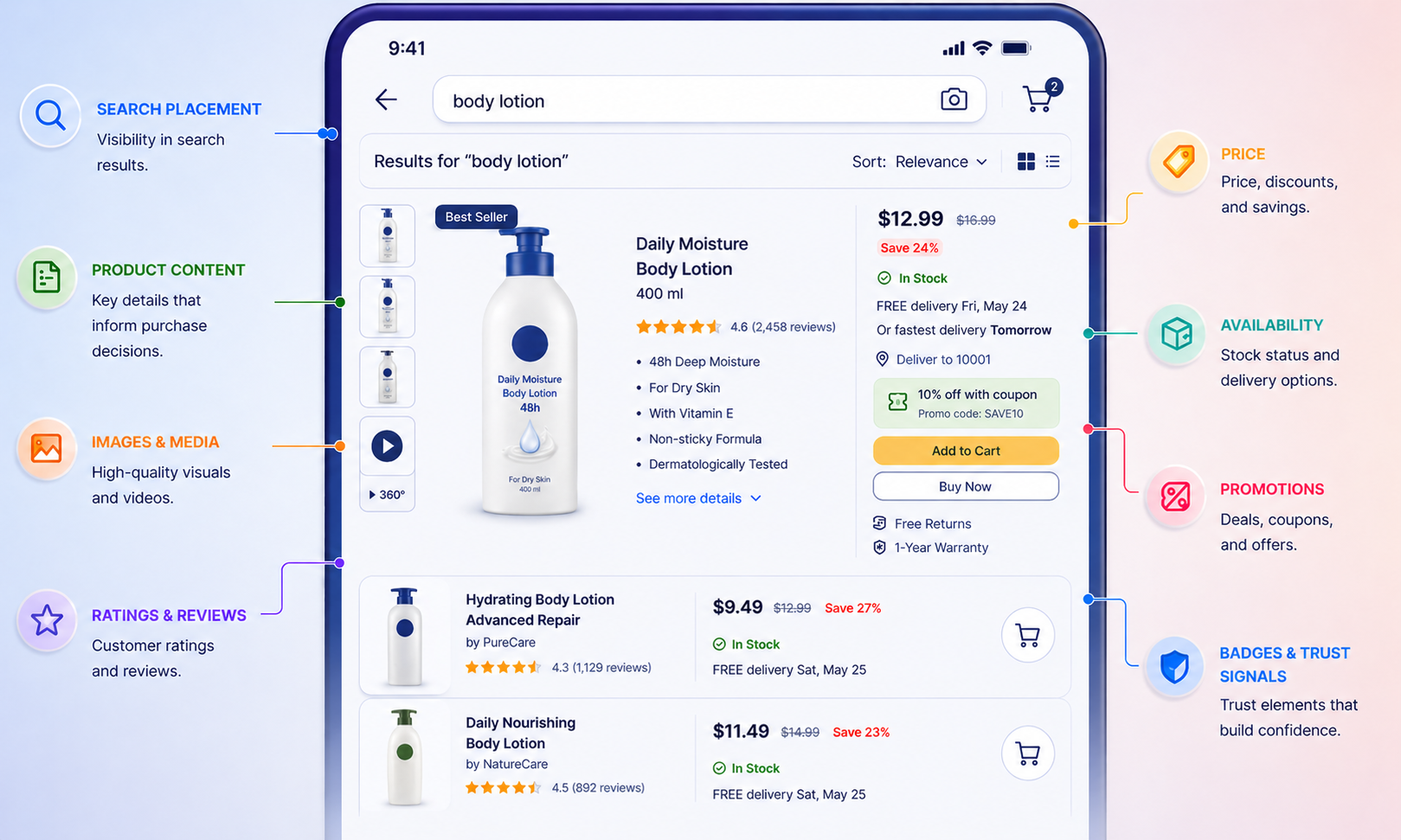
In your first week, map out your brand's digital shelf across every active channel:
- Which platforms is your brand distributed on? (Each is a separate shelf that needs to be monitored independently).
- What does your distribution look like? After being listed, it also needs to be sellable. A product that is listed but out of stock or suppressed is not truly distributed.
- Check your availability status across each channel. Availability means a shopper can actually purchase the product right now. OOS (Out of Stock) listings exist on the shelf but cannot be bought.
- Look at your category taxonomy on each platform. Taxonomy is the hierarchical structure a marketplace uses to organise products. Understanding it is essential before you can make sense of search rank or assortment reports.
Week 2: Audit PDP Quality and Content Coverage
The PDP (Product Detail Page) is the core unit of online conversion. It is where a shopper decides to buy the product or leave and look for something else. Everything on the digital shelf leads here: the search result, the sponsored ad, the category browse page. If the PDP fails, nothing else will matter in converting that sale.

Week two is about understanding the quality of your PDPs. There are the dimensions to look out for -
1. Content Coverage
Content coverage is the measure of how completely each category and SKU has the required product fields present and usable on a retailer platform.
Low content coverage = lower search rank and lower conversion rate.
Look for:
- Missing or non-compliant product titles (wrong format, missing brand name, below minimum character count)
- Fewer than the platform-recommended number of images
- Missing attributes required by the platform taxonomy (size, colour, material, pack size, etc.)
- No A+ Content or Enhanced Brand Content where the platform supports it
- Missing backend search terms or attribute fields that affect search indexing
Learn how Meobyr helps in finding Content Coverage Gaps
2. Content Assets
Hero images, image galleries, videos, infographics, A+ content, brand stores, and other enhanced visual or rich media assets related to a product that help improve discoverability, shopper engagement, and conversion on a retailer or marketplace platform.
3. Content Refresh
Content refresh is the process of regularly updating product listings to ensure content remains accurate, relevant, and aligned with changing shopper behaviour, platform requirements, and search trends.
It includes updating titles, images, attributes, keywords, descriptions, and enhanced content based on performance insights, and seasonal demand
Look for:
- Outdated titles, descriptions, or product claims
- Old images that no longer reflect packaging, variants, or usage
- Missing seasonal or trend-based keyword opportunities
4. Shopper and AI Intent
Shopper and AI intent refers to understanding what customers are searching for and how platform algorithms interpret, rank, and recommend products based on that intent.
It is about matching listings to real purchase behaviour, search patterns, and platform discovery systems powered by search engines, recommendation engines, and AI-driven ranking models.
Look for:
- Listings that answer actual shopper search queries, not just internal brand language
- Missing attributes or phrases commonly used by customers
- Poor search rank despite complete content coverage
Week 3: Understand Assortment, Syndication, and Share of Search
Assortment
Assortment refers to the range of SKUs listed and available across retailers, platforms, and stores. Managing assortment isn’t just about how many SKUs you have; it is about having the right SKUs, in the right channels, at the right time.
Common assortment questions you will need to answer:
- Which SKUs are listed on each platform? Are there gaps versus the master product catalogue?
- Which SKUs are available (live and in stock) versus listed but OOS or suppressed?
- Are there hero SKUs missing from key platforms?
Distribution Gaps
Distribution gaps occur when brand assortment is not consistently available across retailers, stores, or digital platforms.
Look for:
- Retailer Gaps - SKUs missing from one or more retailers compared to benchmark.
- Store Gaps - SKUs available in-store but not enabled online across stores.
- Platform Gaps - SKU inconsistencies between retailer-owned and on-demand platforms.
Explore how Meobyr can find distribution gaps for you
Syndication
Syndication is the process of distributing product content from a source system, typically a PIM (Product Information Management) tool or master content spreadsheet, to retailer and marketplace channels. When syndication breaks down, PDPs go live with incomplete or outdated content. Many content compliance failures are actually syndication failures in disguise.
Share of Search
Share of Search is the proportion of search visibility a brand or SKU captures within a defined set of relevant keywords on a retailer, marketplace, or search platform.
It measures how often your products appear and how prominently they appear when shoppers or AI searches for category-relevant terms compared to competitors.

Explore how you can improve your Share of Search with Meobyr
Week 4: Run Your First Category Review
By week four, you should be ready to present your first structured category review, a snapshot of your category's health across the dimensions that matter most.
- Digital shelf coverage: How many of your target SKUs are live, compliant, and available across all channels?
- Content coverage score: Average score across your top 50 SKUs, with red/amber/green flagging.
- Content Freshness: Number of SKUs with updated content.
- Distribution gaps: SKUs that should be listed but are not, or SKUs that are listed but unavailable.
- Share of Search: Are your hero SKUs in the top 3 results? Top 10? Below the fold?
- Availability and OOS rate: What percentage of your listed SKUs are actually purchasable right now?
The first 30 days as a Category Manager are about building the right operating rhythm, monitoring the digital shelf daily, auditing PDP quality weekly, tracking assortment and availability, and closing execution gaps before they cost you sales. The brands that win on eCommerce are the ones with the most consistent, compliant, and complete presence on the digital shelf.